How Does Higgsfield Genjutsu Work? And How Maboroshi Does the Same Job for Less (2026)
By DeHub Team — 2026-10-24
Higgsfield Genjutsu takes a real video and swaps one thing in it: a person, a pet, a product, an outfit. The camera move, the timing and the background stay exactly as filmed. Higgsfield does not say how it works, so most people assume it is one secret model.
It isn't. Once you take it apart, Genjutsu-style editing is a chain of eight steps, and almost every link is a well-known open model. We rebuilt that chain as Maboroshi, inside DeHub Creator. Running it ourselves showed us where the cost actually goes, and that is why we can charge less.
This guide walks through every step with a real frame from each one. Then it covers changing a whole scene, what each option costs, and what happens to your clip once it is made.
What Higgsfield Genjutsu does
According to Higgsfield's own Genjutsu page, you get two modes:
- Motion Transfer. The movement from your clip drives a new character or a rebuilt scene.
- Object Swap. One element you name is replaced while the rest of the shot stays put. Higgsfield's examples are products, props and outfits.
You upload one clip of 4 to 30 seconds, add up to 30 reference images, and pick one of 30+ presets or write a short description. Output goes up to 1080p. Higgsfield doesn't say which models run underneath.
What you can see is the result. The camera move survives, the lighting matches, the new subject sits behind the right objects, and the mouth moves in time with the voice. A text-to-video model on its own can't do that, so something has to measure the original clip first. That measuring is the part people call reverse engineering, and it breaks into eight jobs.
How it works, step by step
Our starting point was the MIT-licensed Genjutsu Open Source Workflow by Sirio Berati. It showed that the effect could be rebuilt from open parts. We kept the steps that matter, replaced the ones that weren't safe for real users, and added payments, review and recovery. Every image below was made by running the step on a real clip.
Step 1: Normalise the clip
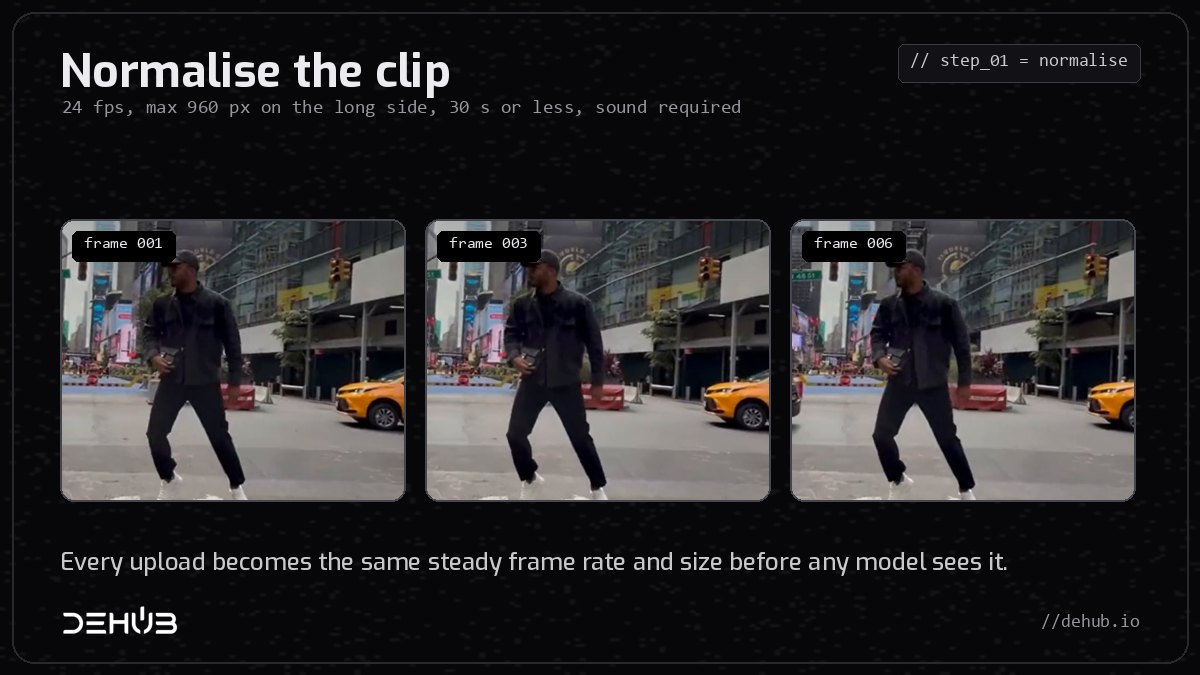
Every upload is converted to a steady 24 frames per second and scaled to at most 960 pixels on its long side. Phone footage often has a variable frame rate, which makes a model drift out of sync. A fixed rate and a fixed size give every later step the same grid to work on, and keep processing fast and cheap.
The clip must be 30 seconds or less and must have a sound track. On Maboroshi's Kling route it must be 3 to 15 seconds, with at least 720 pixels on each side.
Step 2: Lift the soundtrack off
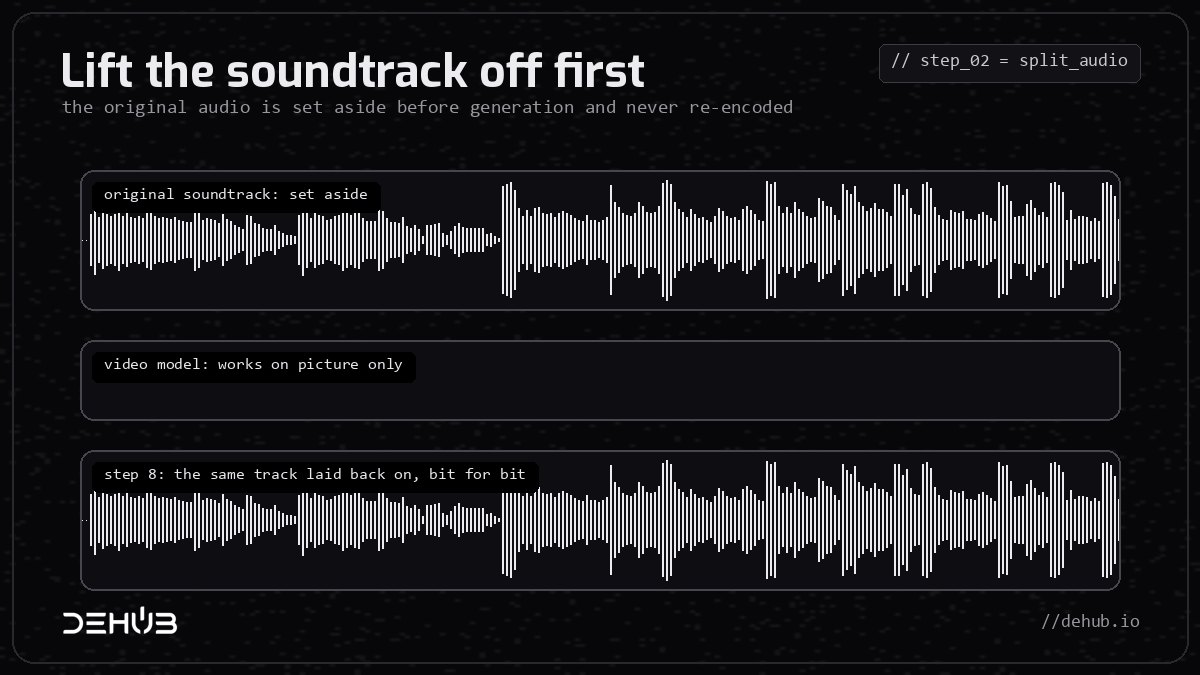
The audio comes off before any generation happens. Demucs, an open model, separates voice from music, so the video model is only handed what it needs. The complete original track is kept aside, untouched.
This is the reason the finished clip sounds exactly like your original. Video models are bad at audio: they re-time it, smear it or invent new sounds. So the original track never goes through the model in the first place.
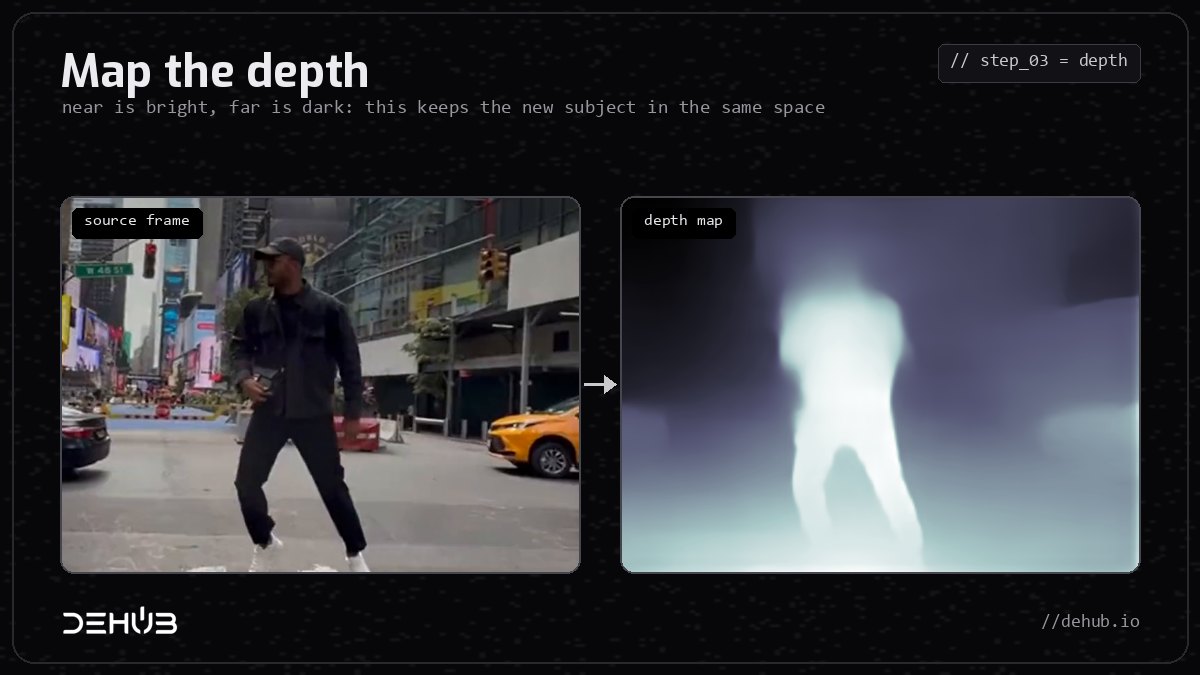
Step 3: Map the depth
A depth model estimates how far every pixel is from the camera, frame by frame. Maboroshi uses Video Depth Anything, which is built for video and stays steady from one frame to the next. The image below was made with a smaller single-frame depth model, but the idea is the same: near is bright, far is dark.
Depth is what lets the new subject stand in the same spot, at the right size, in front of the cabs and behind the lamp post. Without it, swapped characters float.
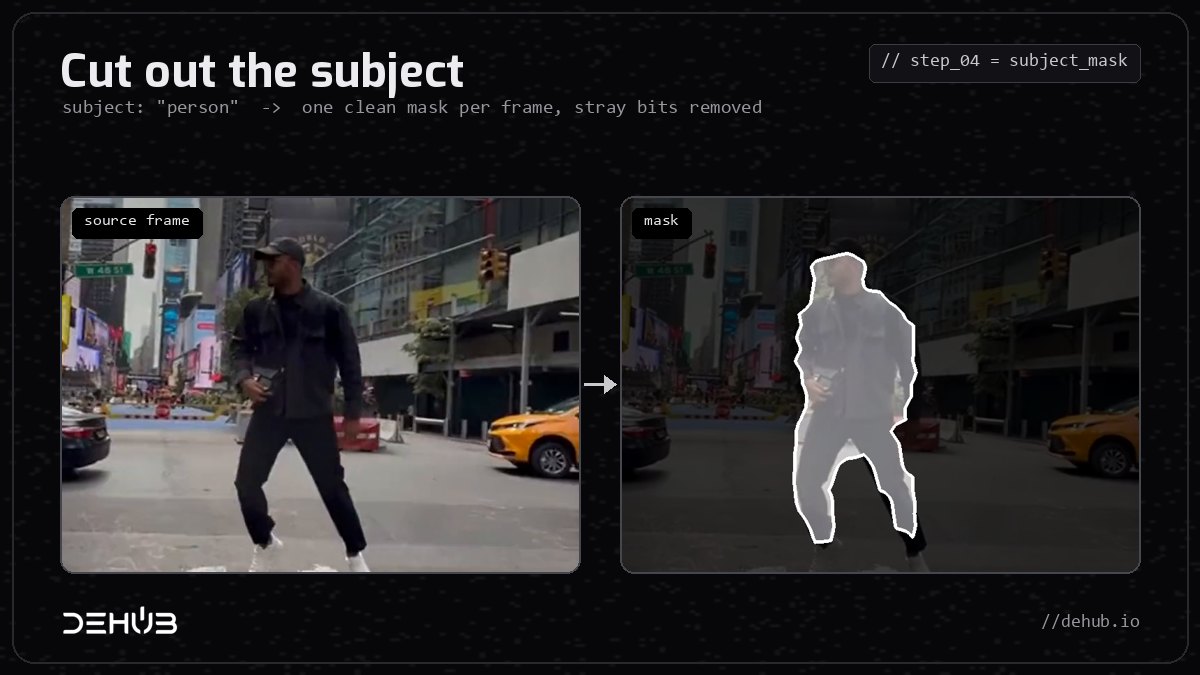
Step 4: Cut out the subject
SAM 3 Video, Meta's Segment Anything for video, finds the subject you name (for example "person") and draws a clean mask around it in every frame. Small fragments at the edges are cleaned up automatically so stray pixels don't confuse the model. The mask tells the renderer exactly what to replace and what to leave alone.
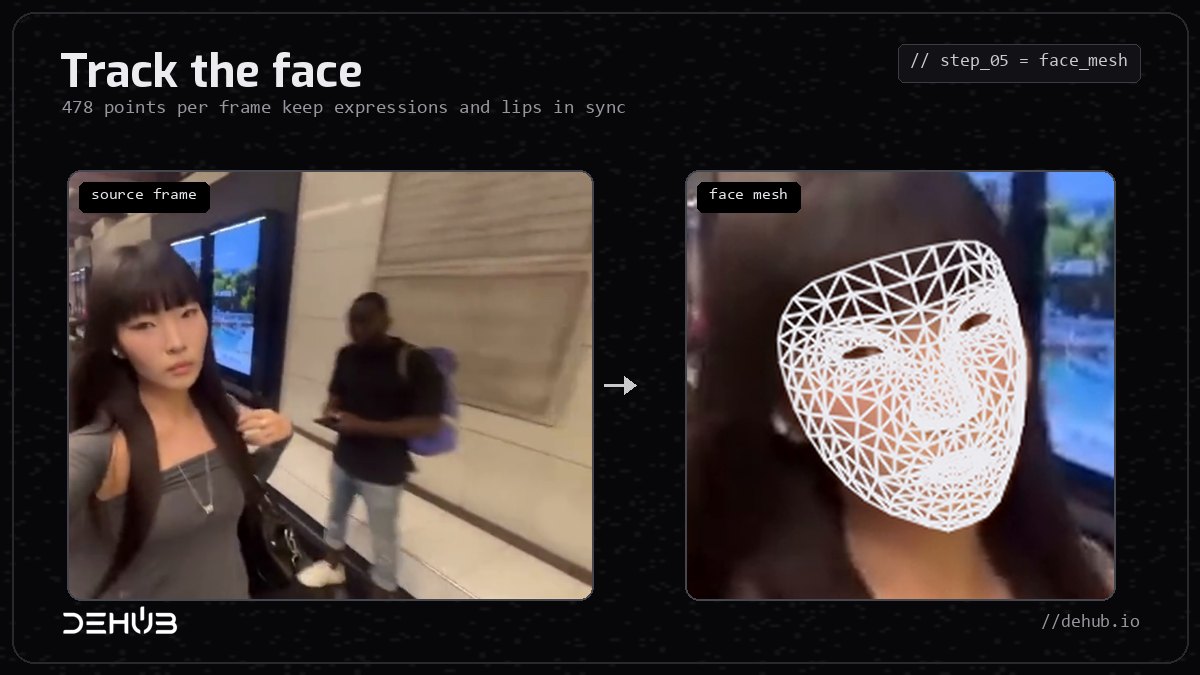
Step 5: Track the face
MediaPipe Face Landmarker traces a mesh of 478 points over each face, every frame. That mesh carries expressions, head turns and lip movement across to the new character. It is why a swapped cat can still look like it is singing the line.
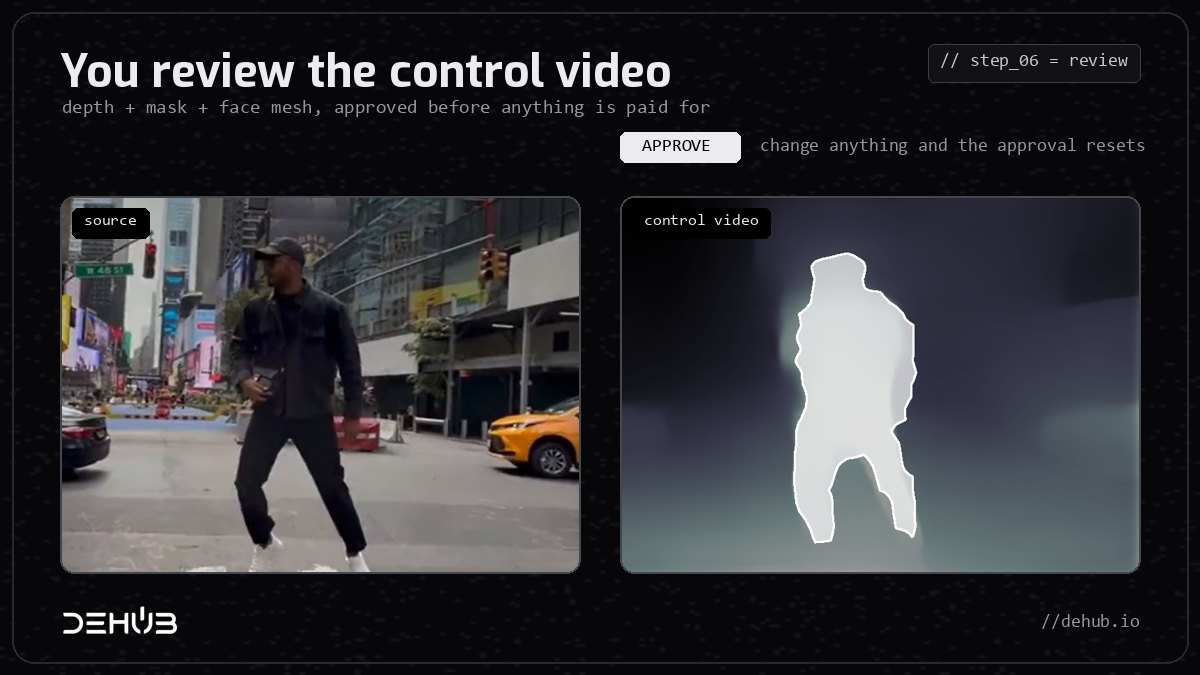
Step 6: You review the control video
Depth, mask and face mesh are combined into one control video, and you see it before anything expensive happens. If the cut-out is wrong, you stop there and pay nothing more. The final render only runs on the exact version you approved. Change the clip, the subject or the reference and the approval resets.
Higgsfield doesn't show you this stage. We think it is the most useful one, because a bad mask is the main reason a paid render comes back wrong.
Step 7: Render
The render runs one of two ways:
- Seedance Premium route. Seedance 2.5 reference-to-video renders a cheap draft from the control video plus your reference images. You only pay for 1080p if you like the draft, and the final is finished from that same draft, so what you approved is what you get.
- Kling route. The original clip and one or two character images go to Kling O3 video-to-video edit in a single pass. There is no preparation and no draft. It is faster and cheaper, and it is our default for most swaps.
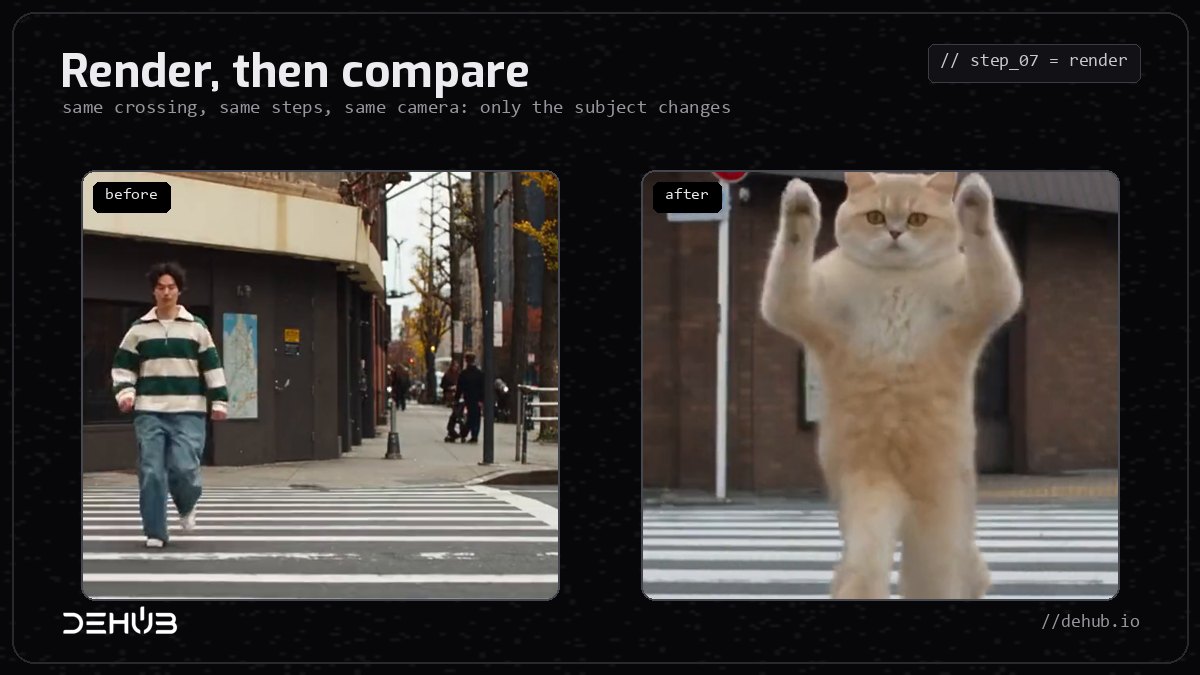
Step 8: Put the original sound back
Both routes finish by laying the complete original audio track back on, copied rather than re-encoded. The voice, the beat and the timing are exactly as you filmed them, which is the first thing people notice when they compare outputs side by side.
Changing any scene, or anything in it
On October 12, 2026, Higgsfield launched Katana, an editing skill that runs inside an AI chat. You give it a reference video, or a preset from its library, plus up to five photos of people, products or clothing. It rebuilds the whole edit around them, keeping the reference's shot structure and pacing, and only re-renders the shots you correct. It needs an active Higgsfield plan and spends that plan's credits.
DeHub covers the same job with three tools, all priced per clip:
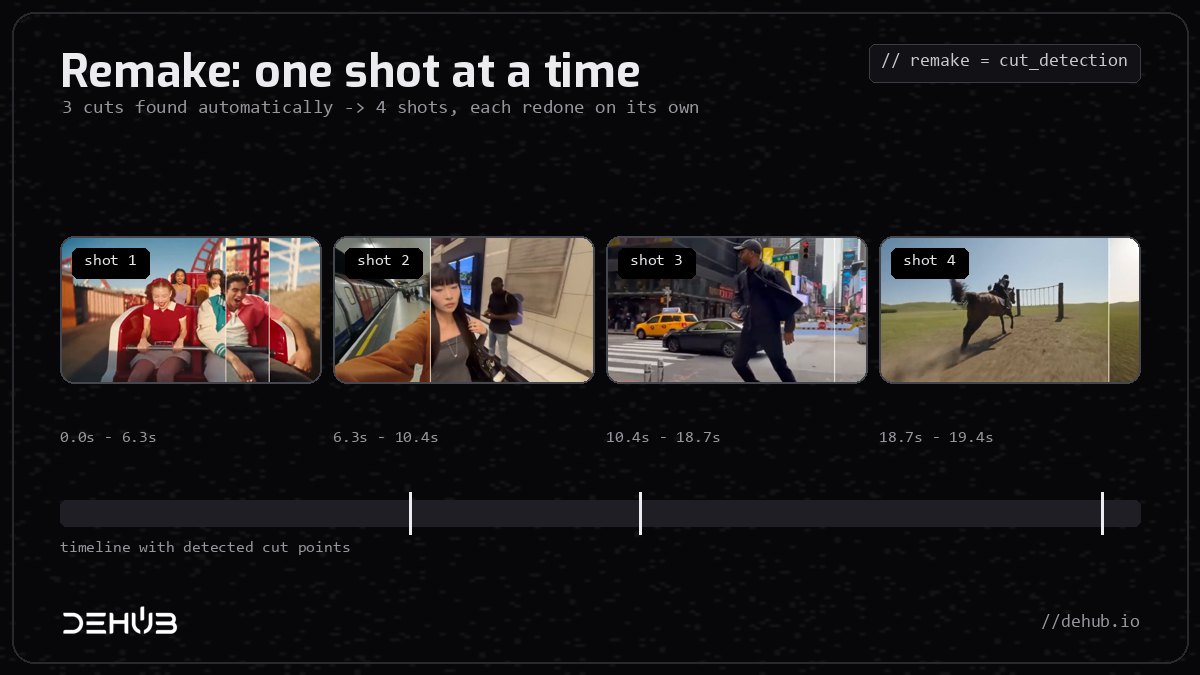
- Remake, for multi-shot edits. Upload a clip with cuts. Maboroshi finds the cut points itself, or you mark them (up to seven), and splits the clip into up to eight shots. Each shot gets its own direction, and you can redo any single shot up to five times without touching the rest. When you are happy, the shots are stitched back in order with the original audio, and the stitching costs nothing extra. Each shot is priced like a normal Kling swap.
- Kling O3 Character Swap, for anything in the frame. In DeHub Creator, this model swaps characters, products or scenery into your clip from up to four images. Use it to change the car, the drink in someone's hand, the jacket, or the street behind them.
- Seedance 2.0 restyle, for the whole scene. Also in Creator, upload a video and describe a new look, such as night-time, claymation or a snowstorm. The motion stays and the whole world around it changes.
The image below shows Remake's cut detection on our own promo video. It found three cuts automatically and split the clip into four shots.
Why we can do it for less
Every step above except the render is cheap to run. Normalising, the audio split, depth, masking and the face mesh run on our own server and cost cents. The money is in the final render model, which is billed by the second. So we:
- Bill by the second. A 5-second clip isn't charged like a 15-second one.
- Skip the paid step when it isn't needed. The Kling route has no preparation charge and no separate HD charge.
- Make you check first. You approve the mask before paying, so fewer paid renders get thrown away.
- Charge no subscription. You pay for the clip in front of you, and credit topped up on DeHub never expires.
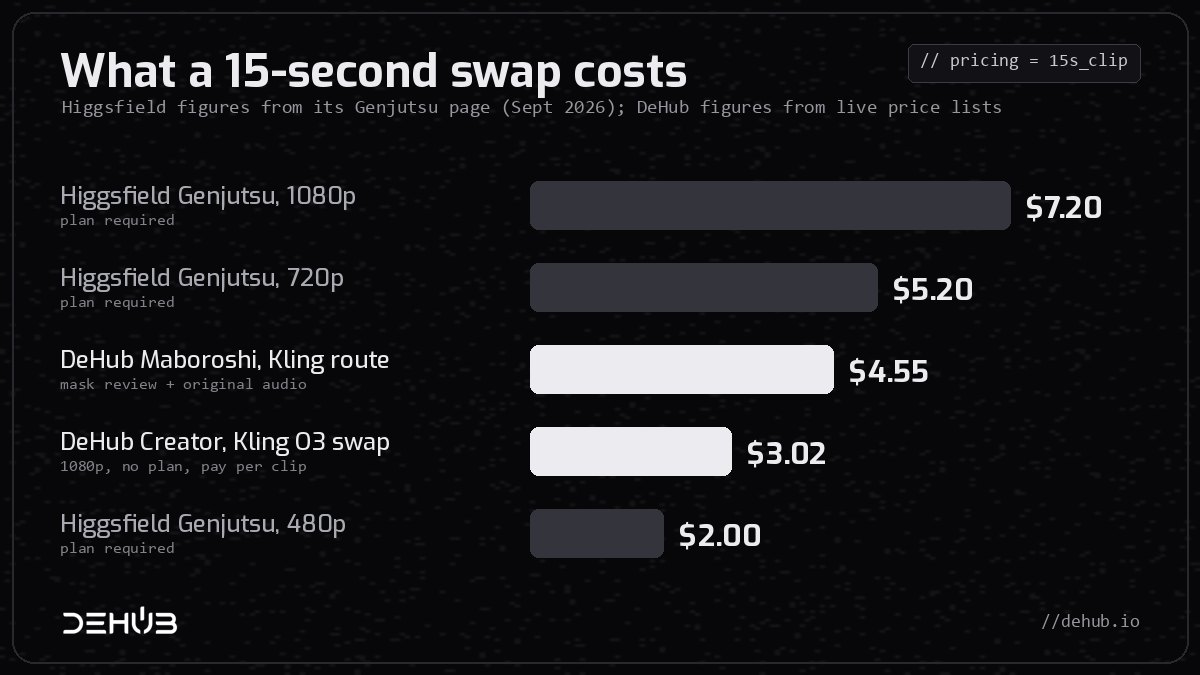
A 15-second clip, side by side:
- Higgsfield Genjutsu, 1080p: 144 credits, about $7.20, plan required
- Higgsfield Genjutsu, 720p: 104 credits, about $5.20, plan required
- DeHub Maboroshi, Kling route, with mask review and original audio: $4.55
- DeHub Creator, Kling O3 Character Swap at 1080p: $3.02
- Higgsfield Genjutsu, 480p: 40 credits, about $2.00, plan required
Shorter clips, where per-second billing wins:
- 5 seconds: Maboroshi $1.75, Creator swap $1.01
- 10 seconds: Maboroshi $3.15, Creator swap $2.02
- 15 seconds: Maboroshi $4.55, Creator swap $3.02
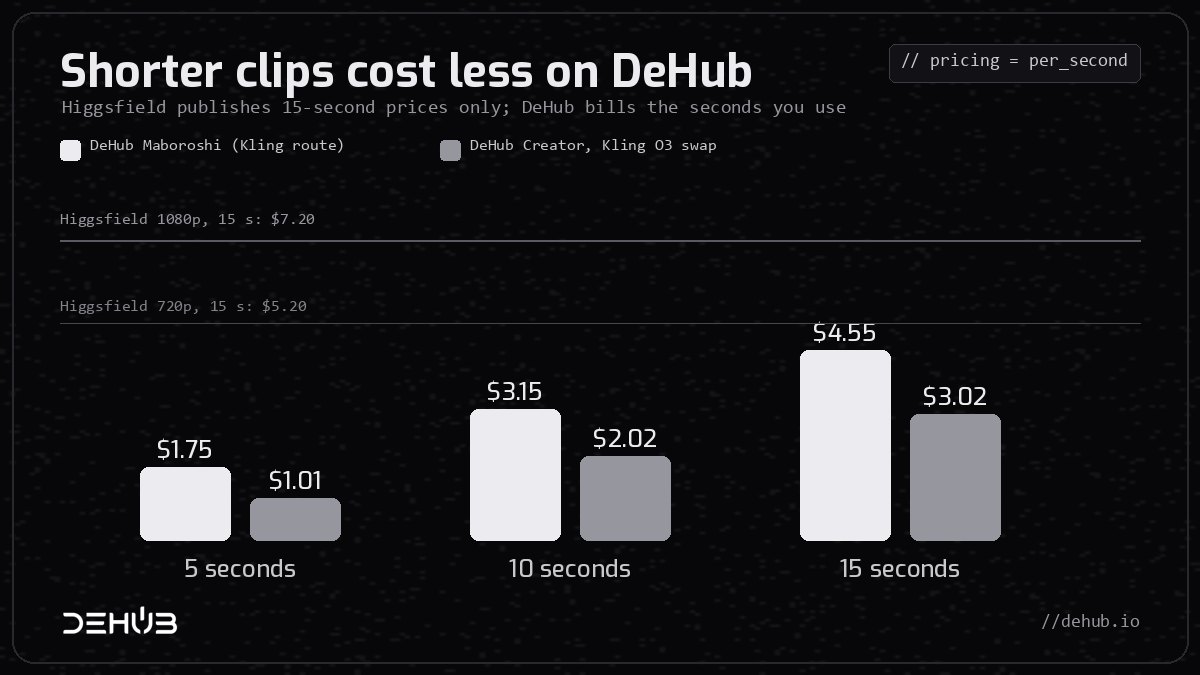
Two honest caveats. If all you need is a 480p clip and you already pay for a Higgsfield plan, its $2.00 is cheaper. And our Seedance Premium route at full 1080p costs much more than Higgsfield, at about $31 for 15 seconds, because it bills every input and output second at close to what the model costs us. We break that down in our Higgsfield Genjutsu alternative guide.
Edit it, post it, earn from it
Higgsfield stops at the download button. On DeHub the clip is a starting point, not the end of the job.
The built-in video editor. DeHub's video editor runs in your browser and in the DeHub app. It is a real multi-track timeline, not a trim slider. Drop your Maboroshi clip in next to your other footage, then:
- Cut on scene changes and music beats.
- Add captions, and translate a whole caption track into another language.
- Remove backgrounds.
- Generate a soundtrack or sound effects.
- Record your screen or voice straight into the timeline.
Projects save to the cloud with version history, and you can share a cut for timestamped review comments.
The social app around it. DeHub is a social network as well as a studio, so a finished edit goes straight from the editor into a post or a Short. There, viewers can tip you, and your views count toward watch-to-earn rewards. Foreign-language viewers can opt in to an automatic dub. DeHub keeps adding to the feed, Shorts, live streaming and AI agents that can post on a schedule.
One account covers the full loop: make the swap, cut it into an edit, post it and get paid for it.
Try it
- Open dehub.io/creator/maboroshi for a subject swap, or choose Kling O3 Character Swap in DeHub Creator to change anything in the frame.
- Upload a short clip with sound and one or two clear reference images.
- Check the mask, approve, and render. The price is shown in dollars before you pay.
- Open the result in the video editor, finish your cut, and post it to your feed.
Frequently asked questions
How does Higgsfield Genjutsu work?
Higgsfield doesn't publish its pipeline. Effects like it are built by measuring the original clip first: its frame rate, sound, depth, the subject's outline and the face mesh. A reference-to-video or video-edit model then re-renders only the subject, and the original audio goes back on at the end. Maboroshi runs that exact chain, and this guide shows each step.
What models does Genjutsu-style editing use?
In Maboroshi: Demucs for audio, Video Depth Anything for depth, SAM 3 Video for the mask, MediaPipe Face Landmarker for the face, and Seedance 2.5 reference-to-video or Kling O3 video-to-video edit for the render.
Is Maboroshi cheaper than Higgsfield Genjutsu?
At 720p and 1080p, yes. A 15-second clip costs $4.55 on Maboroshi's Kling route and $3.02 with Creator's Kling O3 Character Swap, against about $5.20 and $7.20 on Higgsfield. Neither DeHub option needs a subscription. Higgsfield's 480p option, at about $2.00, is cheaper if you already have a plan.
What is Higgsfield Katana, and does DeHub have something like it?
Katana is Higgsfield's chat-based skill for rebuilding a reference edit with your own people, products or clothing. On DeHub, Remake rebuilds multi-shot clips shot by shot, Kling O3 Character Swap changes characters, products or scenery, and Seedance 2.0 restyles a whole scene. All three are priced per clip.
Can I change the background or objects, not just the person?
Yes. Use Kling O3 Character Swap in DeHub Creator to swap products or scenery from reference images, or Seedance 2.0 to restyle the whole clip with a prompt. Maboroshi itself keeps the background exactly as filmed, which is what you want for a clean subject swap.
Does the original audio survive?
Yes. On both Maboroshi routes the complete original track is copied back onto the finished clip, untouched.
The fine print
Higgsfield's Genjutsu figures come from its Genjutsu page as checked in September 2026. Katana details come from Higgsfield's Katana article of October 12, 2026. Higgsfield prices in credits and changes its plans often, so check its live pricing before you compare. DeHub prices are retail rates at the time of writing, and the price shown before each step is always the price you pay. The depth image in step 3 was made with a single-frame depth model for illustration. Maboroshi itself uses Video Depth Anything.